mirror of
https://github.com/Molunerfinn/PicGo.git
synced 2026-09-20 19:17:51 +00:00
Compare commits
8
Commits
| Author | SHA1 | Date | |
|---|---|---|---|
 PiEgg PiEgg
|
cccd2954db | ||
|
PiEgg
|
cfb6146de5 | ||
|
PiEgg
|
45b3227456 | ||
|
PiEgg
|
2450a524ff | ||
|
PiEgg
|
4a29bf2b50 | ||
|
PiEgg
|
24e4a829d8 | ||
|
PiEgg
|
e0d45fa7a2 | ||
|
PiEgg
|
de441a892e |
+1
-1
@@ -1 +1 @@
|
||||
custom: ["https://paypal.me/Molunerfinn"]
|
||||
github: ["Molunerfinn"]
|
||||
|
||||
@@ -0,0 +1 @@
|
||||
18
|
||||
@@ -0,0 +1,24 @@
|
||||
# Repository Guidelines
|
||||
|
||||
## Project Structure & Module Organization
|
||||
PicGo is an Electron + Vue 3 desktop client. Source lives in `src/`: `src/main` for main-process and IPC logic, `src/renderer` for Vue views, and `src/universal` for shared helpers (`types/`, `events/constants.ts`). `background.ts` wires Electron Builder. Static assets and locale YAML files stay in `public/` (add languages under `public/i18n/`), while `docs/` hosts user-facing guides. Automation scripts live in `scripts/`, and legacy tests sit under `test/unit` (Karma) and `test/e2e` (Spectron).
|
||||
|
||||
## Build, Test, and Development Commands
|
||||
- `yarn install` — install dependencies; `npm install` is unsupported because native modules are patched for Yarn.
|
||||
- `yarn dev` / `yarn electron:serve` — start the hot-reload dev environment for both processes.
|
||||
- `yarn build` / `yarn electron:build` — package the app into `dist_electron/`; set `ELECTRON_MIRROR=https://npmmirror.com/mirrors/electron/` when downloads are slow.
|
||||
- `yarn lint` / `yarn lint:fix` — run or auto-fix ESLint (Standard, TypeScript, Vue rules).
|
||||
- `yarn lint:dpdm` — fail fast on circular dependencies in `src/`.
|
||||
- `yarn gen-i18n` — regenerate typed locales after touching `public/i18n/*.yml`.
|
||||
|
||||
## Coding Style & Naming Conventions
|
||||
Follow ESLint Standard defaults: two-space indentation, single quotes, trailing commas where allowed, and no stray semicolons. Author new modules in TypeScript. Keep renderer files browser-safe; route Node APIs through IPC helpers such as `src/main/events/picgoCoreIPC.ts`. Name Vue components in PascalCase (`UploadPanel.vue`) and use camelCase for utilities. Centralize IPC event names inside `src/universal/events/constants.ts`, and store enums/types under `src/universal/types/` so they stay reusable.
|
||||
|
||||
## Testing Guidelines
|
||||
Place renderer unit specs in `test/unit/specs` with the `.spec.js` suffix; Karma picks them up via `require.context`. Run them with `npx karma start test/unit/karma.conf.js --single-run` and ensure new renderer folders are covered. Spectron e2e cases live in `test/e2e/specs`; build first (`yarn build`), then run `npx mocha test/e2e/index.js` so Spectron can launch `dist/electron/main.js`. Document any test data, IPC stubs, or fixtures you add to keep suites reproducible.
|
||||
|
||||
## Commit & Pull Request Guidelines
|
||||
Commits follow the PicGo conventional preset enforced by Husky (`yarn lint:dpdm` + Commitlint). Stage your changes and run `yarn cz` to craft messages that pass CI. Pull requests should explain the change, link related issues, and attach UI screenshots or recordings. Note how you validated the work (dev server, build, Karma, Spectron) and call out migration or configuration steps reviewers must perform.
|
||||
|
||||
## Internationalization Tips
|
||||
Add locales by creating `public/i18n/<locale>.yml`, exposing its `LANG_DISPLAY_LABEL`, and registering it in `src/universal/i18n/index.ts`. Finish with `yarn gen-i18n` so the generated typings stay in sync.
|
||||
@@ -1,121 +0,0 @@
|
||||
# CLAUDE.md
|
||||
|
||||
This file provides guidance to Claude Code (claude.ai/code) when working with code in this repository.
|
||||
|
||||
## Project Overview
|
||||
PicGo is an Electron-based cross-platform image upload tool that supports multiple image hosting services (图床) including SMMS, GitHub, Aliyun OSS, Qiniu, Tencent COS, and more. It's built with Vue 3 + TypeScript for the renderer process and Node.js for the main process.
|
||||
|
||||
## Architecture
|
||||
|
||||
### Core Structure
|
||||
- **Main Process**: `src/main/` - Electron main process with Node.js capabilities
|
||||
- **Renderer Process**: `src/renderer/` - Vue 3 frontend (no direct Node.js access)
|
||||
- **Universal Code**: `src/universal/` - Shared code between processes
|
||||
- **Entry Points**:
|
||||
- `src/background.ts` - Main process bootstrap
|
||||
- `src/main.ts` - Renderer process entry
|
||||
|
||||
### Key Directories
|
||||
- `src/main/apis/` - Main process APIs (uploader, system, window management)
|
||||
- `src/main/server/` - HTTP server for external uploads
|
||||
- `src/renderer/pages/` - Vue components for different views
|
||||
- `src/renderer/store/` - Vuex-like state management
|
||||
- `public/i18n/` - Internationalization files
|
||||
- `test/` - Unit and e2e tests
|
||||
|
||||
### Data Storage
|
||||
- **Config**: JSON file at `~/.picgo/config.json` (via `@picgo/store`)
|
||||
- **Gallery**: Separate DB for uploaded images history
|
||||
- **Settings**: Stored in config with namespaced keys (`settings.*`)
|
||||
|
||||
## Development Commands
|
||||
|
||||
### Setup & Install
|
||||
```bash
|
||||
yarn install # Use yarn, NOT npm install
|
||||
```
|
||||
|
||||
### Development
|
||||
```bash
|
||||
yarn dev # Start development mode with hot reload
|
||||
yarn electron:serve # Alias for dev
|
||||
```
|
||||
|
||||
### Build & Release
|
||||
```bash
|
||||
yarn build # Build for production
|
||||
yarn electron:build # Build for production
|
||||
yarn release # Build and publish release
|
||||
```
|
||||
|
||||
### Code Quality
|
||||
```bash
|
||||
yarn lint # Run ESLint
|
||||
yarn lint:fix # Auto-fix lint issues
|
||||
yarn lint:dpdm # Check circular dependencies
|
||||
yarn gen-i18n # Generate i18n type definitions
|
||||
```
|
||||
|
||||
### Testing
|
||||
```bash
|
||||
# Unit tests
|
||||
yarn test:unit # Run unit tests with Karma
|
||||
|
||||
# E2E tests
|
||||
yarn test:e2e # Run end-to-end tests
|
||||
```
|
||||
|
||||
### Git Workflow
|
||||
```bash
|
||||
yarn cz # Commit with conventional commits
|
||||
```
|
||||
|
||||
## Key Development Patterns
|
||||
|
||||
### Process Communication
|
||||
- Use IPC events for cross-process communication
|
||||
- Event names defined in `src/universal/events/constants.ts`
|
||||
- Main process handles Node.js operations, renderer sends requests
|
||||
|
||||
### Configuration
|
||||
- Settings stored in namespaced config keys
|
||||
- Use `saveConfig()` and `getConfig()` from renderer
|
||||
- Main process uses direct picgo instance APIs
|
||||
|
||||
### Internationalization
|
||||
- Translation files in `public/i18n/*.yml`
|
||||
- Run `yarn gen-i18n` after modifying translations
|
||||
- Use `T()` function for translations in renderer
|
||||
|
||||
### File Organization
|
||||
- **Main**: Node.js operations, file system, native features
|
||||
- **Renderer**: UI, Vue components, user interactions
|
||||
- **Universal**: Types, constants, shared utilities
|
||||
|
||||
## Build Configuration
|
||||
- **Electron Builder**: Configured in `vue.config.js`
|
||||
- **Platforms**: macOS (dmg), Windows (exe), Linux (AppImage, snap)
|
||||
- **Auto-updater**: Disabled (commented out in background.ts)
|
||||
|
||||
## Common Tasks
|
||||
|
||||
### Adding a new feature
|
||||
1. Determine if it belongs in main or renderer process
|
||||
2. Add events to `src/universal/events/constants.ts` if needed
|
||||
3. For Node.js operations, add IPC handlers in main process
|
||||
4. For UI, add Vue components in renderer
|
||||
|
||||
### Modifying i18n
|
||||
1. Update `public/i18n/[lang].yml`
|
||||
2. Run `yarn gen-i18n`
|
||||
3. Add language option in `src/universal/i18n/index.ts`
|
||||
|
||||
### Adding new picbed support
|
||||
1. Use picgo plugin system (external to core)
|
||||
2. Core picbed configs are in `src/renderer/pages/picbeds/`
|
||||
|
||||
## Environment Notes
|
||||
- **Development**: Uses `vue-cli-plugin-electron-builder`
|
||||
- **Production**: Built with `electron-builder`
|
||||
- **Testing**: Karma for unit tests, Spectron for e2e
|
||||
- **Hot reload**: Available for both main and renderer processes
|
||||
@@ -1,3 +1,17 @@
|
||||
<div align="center" markdown="1">
|
||||
<sup>Special thanks to:</sup>
|
||||
<br>
|
||||
<a href="https://go.warp.dev/picgo">
|
||||
<img alt="Warp sponsorship" width="400" src="https://raw.githubusercontent.com/warpdotdev/brand-assets/refs/heads/main/Github/Sponsor/Warp-Github-LG-03.png">
|
||||
</a>
|
||||
|
||||
### [Warp, the intelligent terminal for developers](https://go.warp.dev/picgo)
|
||||
[Available for MacOS, Linux, & Windows](https://go.warp.dev/picgo)<br>
|
||||
|
||||
</div>
|
||||
|
||||
---
|
||||
|
||||
<div align="center">
|
||||
<img src="https://raw.githubusercontent.com/Molunerfinn/test/master/picgo/New%20LOGO-150.png" alt="">
|
||||
<h1>PicGo</h1>
|
||||
@@ -54,15 +68,14 @@ PicGo 本体支持如下图床:
|
||||
|
||||
## 下载安装
|
||||
|
||||
| 下载源 | 地址/安装方式 | 平台 | 备注 |
|
||||
|---|---|---|---|
|
||||
| GitHub Release | https://github.com/Molunerfinn/PicGo/releases | All | 国内下载速度可能会慢 |
|
||||
| [腾讯云COS](https://cloud.tencent.com/product/cos) | https://github.com/Molunerfinn/PicGo/releases 附在更新日志结尾 | All | 感谢 [腾讯云COS](https://cloud.tencent.com/product/cos) 提供的赞助支持 |
|
||||
| [山东大学镜像站](https://mirrors.sdu.edu.cn/) | https://mirrors.sdu.edu.cn/github-release/Molunerfinn_PicGo | All | 感谢 [山东大学镜像站](https://mirrors.sdu.edu.cn/) 提供的镜像支持 |
|
||||
| [Scoop](https://scoop.sh/) | `scoop bucket add extras` & `scoop install picgo` | Windows | 感谢 @huangnauh 和 @Gladtbam 的贡献 |
|
||||
| [Chocolatey](https://chocolatey.org/) | `choco install picgo` | Windows | 感谢 @iYato 的贡献 |
|
||||
| [Homebrew](https://brew.sh/) | `brew install picgo --cask` | macOS | 感谢 @womeimingzi11 的贡献 |
|
||||
| [AUR](https://aur.archlinux.org/packages/yay) | `yay -S picgo-appimage` | Arch-Linux | 感谢 @houbaron 的贡献 |
|
||||
| 下载源 | 地址/安装方式 | 平台 | 备注 |
|
||||
| --------------------------------------------- | ----------------------------------------------------------- | ---------- | ----------------------------------------------------------------- |
|
||||
| GitHub Release | https://github.com/Molunerfinn/PicGo/releases | All | 国内下载速度可能会慢 |
|
||||
| [山东大学镜像站](https://mirrors.sdu.edu.cn/) | https://mirrors.sdu.edu.cn/github-release/Molunerfinn_PicGo | All | 感谢 [山东大学镜像站](https://mirrors.sdu.edu.cn/) 提供的镜像支持 |
|
||||
| [Scoop](https://scoop.sh/) | `scoop bucket add extras` & `scoop install picgo` | Windows | 感谢 @huangnauh 和 @Gladtbam 的贡献 |
|
||||
| [Chocolatey](https://chocolatey.org/) | `choco install picgo` | Windows | 感谢 @iYato 的贡献 |
|
||||
| [Homebrew](https://brew.sh/) | `brew install picgo --cask` | macOS | 感谢 @womeimingzi11 的贡献 |
|
||||
| [AUR](https://aur.archlinux.org/packages/yay) | `yay -S picgo-appimage` | Arch-Linux | 感谢 @houbaron 的贡献 |
|
||||
|
||||
## 应用截图
|
||||
|
||||
|
||||
@@ -0,0 +1,131 @@
|
||||
# PicGo 2.4.0 Changelog
|
||||
|
||||
## Features
|
||||
- 新增 相册页新增文件名展示,参考 #1050
|
||||
- 新增 相册中和顶部栏窗口中无法展示的图片或者 url 将会展示默认图片,参考#1050
|
||||

|
||||
- 新增 macOS 顶部栏窗口新增文件名展示,参考 #1054
|
||||
- 新增 同种类型图床支持多份配置,上传时可以指定某一份配置进行上传。感谢 @STDSuperman ,参考 #1016
|
||||

|
||||
- 新增 选择图床的菜单可以支持选择该图床类型某一项具体配置
|
||||

|
||||
- 新增 显示 dock 栏图标选项,参考 #1045
|
||||
<img width="787" alt="image" src="https://github.com/Molunerfinn/PicGo/assets/12621342/bb9492f1-6522-45ce-ae5d-c614901d8b06" />
|
||||
- 新增 PicGo 修复工具箱,可以自行排查一些问题
|
||||
<img width="324" alt="image" src="https://github.com/Molunerfinn/PicGo/assets/12621342/98cf6e64-7313-4ebe-83d0-aa86e4514109" />
|
||||
- 新增 对输出的 URL 进行 encode 转义的选项,参考 #731
|
||||
<img width="775" alt="image" src="https://github.com/Molunerfinn/PicGo/assets/12621342/6e0c13dd-3404-4b07-9c99-412321835b27" />
|
||||
- 新增 支持拖拽任意格式文件上传,参考 #1052
|
||||
- 新增 腾讯云 COS 支持 `Endpoint` 配置 和 `极智压缩` 配置。 感谢 @palmcivet @yc910920 的贡献!
|
||||

|
||||
- 新增 `tips` 配置渲染的支持,可以动态渲染 Uploader config 的 tips。支持 markdown 格式。参考 [tcyun uploader config](https://github.com/PicGo/PicGo-Core/blob/dev/src/plugins/uploader/tcyun.ts#L280)
|
||||

|
||||
- 新增 上传界面展示当前图床使用的配置名
|
||||
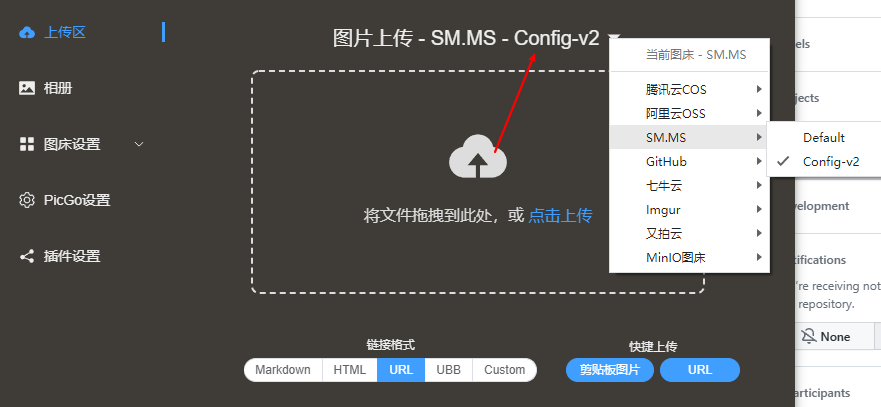
|
||||
- 新增 相册页工具栏,目前内置 `批量修改图片 URL HOST 的功能` 。参考 #875
|
||||
注意:需要先选中指定的图片,然后会根据已选中的图片进行修改,你可以通过图床筛选功能只筛选出需要修改的图片。
|
||||
例如,你有一批图片都是 `https://www.a.com/...` 打头的 URL,你想把 `www.a.com` 批量修改成 `www.b.com` ,就可以用这个功能
|
||||
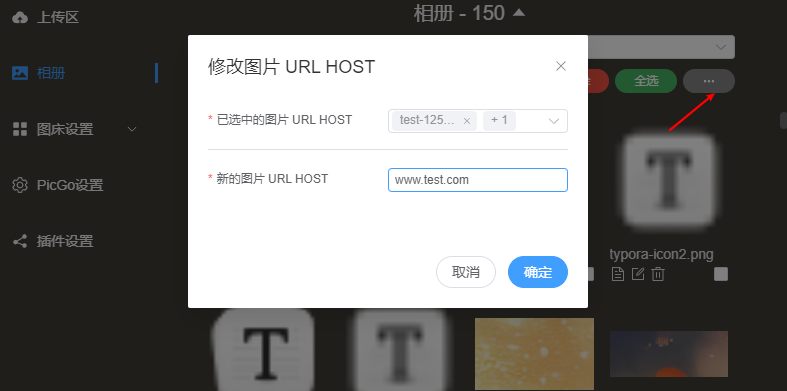
|
||||
- 新增 `启动模式`,可以设置启动的时候是否要打开窗口。全平台支持 `静默启动`(默认值) & `打开主窗口`,Windows 和 Linux 额外支持 `打开 Mini 窗口`。参考 #915
|
||||
<img width="577" alt="image" src="https://github.com/Molunerfinn/PicGo/assets/12621342/7e63bb5c-44b0-480e-824f-3c2edbed4fbb" />
|
||||
- 新增 PicGo Server 支持表单形式上传图片。参考 #428 ,感谢 @happy-game
|
||||
表单字段为 files。参考截图:
|
||||
<img width="951" alt="image" src="https://github.com/user-attachments/assets/14244f1d-60f5-487f-bde6-6d0e009645fb" />
|
||||
|
||||
## Bug Fixes
|
||||
- 修复 windows 右键菜单配置生成脚本,参考 #1019
|
||||
- 修复 自定义链接 URL encode 问题,参考 #1112
|
||||
- 修复 日志写入可能存在死循环问题,参考 #1101
|
||||
- 修复 拖拽文件到顶部栏图标报错问题,参考 #1107
|
||||
- 修复 文件名 encode 问题。参考 #1121
|
||||
- 修复 GitHub 重名文件上传不再报错。
|
||||
- 修复 beta.2 版本部分样式问题
|
||||
- 修复 重命名窗口某些情况下显示文件名过慢的问题,参考 #1130
|
||||
- 修复 打开配置文件打开的是日志文件的 bug,参考 #1163
|
||||
- 修复 插件配置弹窗打开后无法正确读取和保存配置的问题。
|
||||
- 修复 无法新增图床配置的问题(新增变成了编辑)。参考 #1198,#1196
|
||||
- 修复 macOS 右键菜单消失问题。感谢 @muwoo 。参考 #1179
|
||||
- 修复 macOS 顶部栏窗口右键之后一闪而过的问题。 感谢 @QThans。 参考 #1217
|
||||
- 修复 图床配置页面配置项过多时无法滚动到底部的问题。参考 #1237
|
||||
- 修复 腾讯云 COS URL encode 的问题。参考 #1265
|
||||
- 修复 插件列表无法搜索的问题。 参考 #1297
|
||||
- 修复 剪贴板文件名丢失 `秒` 的问题。 参考 #1293
|
||||
- 修复 macOS 顶部栏点击图片复制链接失效的问题。 参考 #1280 , #1210
|
||||
- 修复 自动复制 URL 这个开关无法被关闭的问题。参考 #1294 ,感谢 @happy-game
|
||||
- 修复 wayland 里无法使用剪贴板图片的问题。参考 #1261 ,感谢 @happy-game
|
||||
- 修复 直接通过 URL 上传图片的时候,带有汉字的 URL 上传后,文件名被 encode 的问题。 参考 #1339
|
||||
|
||||
## Other
|
||||
- 由于 PicGo 存储的 COS 空间被恶意刷大量流量导致欠费,暂时停止 COS 渠道的 PicGo 分发。
|
||||
- 更新至 Vue3
|
||||
- 重构部分代码
|
||||
- 重构部分代码
|
||||
- 补充更详细的快捷键相关日志,参考 #1031
|
||||
- 已知问题:部分按钮样式有点问题,下个版本会修复
|
||||
- 更新 README中的 scoop 下载安装的部分,感谢 @wuhang2003
|
||||
|
||||
----------
|
||||
|
||||
# PicGo 2.4.0 Changelog
|
||||
|
||||
## Features
|
||||
- Add filename display in the gallery (#1050).
|
||||
- Add default placeholders when images/URLs cannot be shown in the gallery or tray window (#1050).
|
||||

|
||||
- Add filename display in the macOS tray window (#1054).
|
||||
- Allow multiple configs per uploader type and choose one for upload (thanks @STDSuperman, #1016).
|
||||

|
||||
- Allow the uploader selection menu to pick a specific config entry for that uploader type.
|
||||

|
||||
- Add Dock icon visibility option (#1045).
|
||||
<img width="787" alt="image" src="https://github.com/Molunerfinn/PicGo/assets/12621342/bb9492f1-6522-45ce-ae5d-c614901d8b06" />
|
||||
- Add PicGo Repair Toolbox for self-diagnosis.
|
||||
<img width="324" alt="image" src="https://github.com/Molunerfinn/PicGo/assets/12621342/98cf6e64-7313-4ebe-83d0-aa86e4514109" />
|
||||
- Add option to encode/escape output URLs (#731).
|
||||
<img width="775" alt="image" src="https://github.com/Molunerfinn/PicGo/assets/12621342/6e0c13dd-3404-4b07-9c99-412321835b27" />
|
||||
- Support drag-and-drop uploads for arbitrary file formats (#1052).
|
||||
- Tencent COS: add Endpoint and Intelligent Compression settings (thanks @palmcivet @yc910920).
|
||||

|
||||
- Add Markdown-rendered tips for uploader config (see tcyun uploader config).
|
||||

|
||||
- Show the active uploader config name in the upload screen.
|
||||

|
||||
- Gallery toolbar: bulk replace image URL host (#875).
|
||||
Note: select images first; you can filter by uploader; e.g., replace `https://www.a.com/...` with `https://www.b.com/...`.
|
||||

|
||||
- Add “Startup Mode”: Silent (default) / Main Window; Windows/Linux also support Mini Window (#915).
|
||||
<img width="577" alt="image" src="https://github.com/Molunerfinn/PicGo/assets/12621342/7e63bb5c-44b0-480e-824f-3c2edbed4fbb" />
|
||||
- PicGo Server: support multipart form uploads (field `files`, #428, thanks @happy-game).
|
||||
<img width="951" alt="image" src="https://github.com/user-attachments/assets/14244f1d-60f5-487f-bde6-6d0e009645fb" />
|
||||
|
||||
## Bug Fixes
|
||||
- Fix Windows context-menu config script generation (#1019).
|
||||
- Fix custom link URL encoding (#1112).
|
||||
- Fix potential logging dead loop (#1101).
|
||||
- Fix drag-to-tray upload error (#1107).
|
||||
- Fix filename encoding (#1121).
|
||||
- Prevent errors on GitHub uploads with duplicate filenames.
|
||||
- Fix beta.2 style issues.
|
||||
- Fix slow filename display in the rename window (#1130).
|
||||
- Fix “open config file” actually opening the log file (#1163).
|
||||
- Fix plugin config dialog not reading/saving correctly.
|
||||
- Fix inability to add new uploader configs (created as edit) (#1198, #1196).
|
||||
- Fix macOS context menu disappearing (thanks @muwoo, #1179).
|
||||
- Fix macOS tray window flashing after right-click (thanks @QThans, #1217).
|
||||
- Fix uploader config page not scrollable when many fields (#1237).
|
||||
- Fix Tencent COS URL encoding (#1265).
|
||||
- Fix plugin list search not working (#1297).
|
||||
- Fix clipboard filename losing “seconds” (#1293).
|
||||
- Fix macOS tray copy-link failing on click (#1280, #1210).
|
||||
- Fix auto-copy URL toggle not turning off (#1294, thanks @happy-game).
|
||||
- Fix Wayland clipboard image upload issue (#1261, thanks @happy-game).
|
||||
- Fix URL uploads with Chinese characters being encoded in filenames (#1339).
|
||||
|
||||
## Other
|
||||
- COS distribution paused due to malicious traffic charges.
|
||||
- Upgrade to Vue3.
|
||||
- Refactor parts of the code.
|
||||
- Refactor parts of the code (again).
|
||||
- Add more detailed hotkey logs (#1031).
|
||||
- Known issue: some button styles were incorrect (fixed in later betas).
|
||||
- Update README scoop installation section (thanks @wuhang2003).
|
||||
@@ -0,0 +1,48 @@
|
||||
# gen_changelog.md
|
||||
|
||||
This guide describes how to generate a consolidated changelog for any PicGo release series (e.g., 2.4.0, 2.5.0) from the GitHub release notes of its betas and finals.
|
||||
|
||||
## Source of truth
|
||||
- Use GitHub release pages only (e.g., `https://github.com/Molunerfinn/PicGo/releases/tag/vX.Y.Z-beta.N` and `vX.Y.Z` if present). You can fetch these via MCP GitHub APIs (e.g., `get_release_by_tag`, `list_releases`) instead of manual browsing.
|
||||
- Do **not** use `CHANGELOG.md` in the repo.
|
||||
- Preserve all text and images exactly as written in the releases.
|
||||
|
||||
## Structure
|
||||
- Target file: `changelog/X.Y.Z.md` (replace with the series version).
|
||||
- Three top-level sections: `## Features`, `## Bug Fixes`, `## Other`.
|
||||
- Do **not** nest content under individual beta version headers; merge all items into these sections.
|
||||
- Keep items in chronological order (early → late) within each section, mirroring the beta sequence.
|
||||
- Keep inline issue references, thanks, and notes as-is.
|
||||
- Remove download-link sections entirely.
|
||||
- After the Chinese sections, insert a line with `----------`, then add a full English translation with the same structure/content (including images).
|
||||
|
||||
## Formatting rules
|
||||
- Markdown, plain ASCII.
|
||||
- Bullet lists only; no numbered lists required.
|
||||
- Indent images under their bullet with two spaces to keep association clear.
|
||||
- Keep inline HTML image tags from the releases (e.g., `<img width="...">`) untouched.
|
||||
- Keep line breaks and multi-line notes intact.
|
||||
- Do not reword or summarize; copy content verbatim except for removing beta headers and download sections.
|
||||
- English translation must mirror the Chinese bullets in order and content (keep images alongside the translated bullets).
|
||||
|
||||
## Regeneration steps
|
||||
1) Collect all release bodies for the target series (e.g., `vX.Y.Z-beta.0…N` and, if present, `vX.Y.Z`) from GitHub releases.
|
||||
2) For each release, copy bullets and images into the appropriate section:
|
||||
- Features ↔ “Feature(s)” or “Features” blocks.
|
||||
- Bug Fixes ↔ “Bug Fixes” blocks.
|
||||
- Other ↔ “Other”, “Notice”, or misc notes that are not features/bugs.
|
||||
3) Omit “国内可下载链接” (or any download links) entirely.
|
||||
4) Drop beta subheadings; keep only section-level bullets in chronological order.
|
||||
5) Ensure images remain adjacent to their bullets with indentation.
|
||||
6) After the Chinese sections are complete, insert `----------` on its own line.
|
||||
7) Append the English translation, preserving bullet order and images, under `## Features`, `## Bug Fixes`, `## Other` again (same section titles, just English content; no “(English)” suffix).
|
||||
8) Save the result to `changelog/X.Y.Z.md`.
|
||||
|
||||
## Quick checklist
|
||||
- [ ] All features present with images kept.
|
||||
- [ ] All bug fixes present.
|
||||
- [ ] All “Other” notes present.
|
||||
- [ ] No beta headers.
|
||||
- [ ] No download links.
|
||||
- [ ] Chronological ordering preserved.
|
||||
- [ ] English translation present with matching bullets/images after `----------`.
|
||||
+207
-836
File diff suppressed because it is too large
Load Diff
@@ -1,16 +0,0 @@
|
||||
<!DOCTYPE html>
|
||||
<html lang="en">
|
||||
<head>
|
||||
<meta charset="UTF-8" />
|
||||
<link rel="icon" type="image/svg+xml" href="/vite.svg" />
|
||||
<meta name="viewport" content="width=device-width, initial-scale=1.0" />
|
||||
<title>PicGo - The Ultimate Image Upload & Management Tool</title>
|
||||
<meta name="description" content="Seamlessly upload images to multiple cloud storage services with a beautiful, cross-platform interface. Supports 20+ image hosting services." />
|
||||
<link href="https://fonts.googleapis.com/css2?family=Inter:wght@300;400;500;600;700;800&display=swap" rel="stylesheet">
|
||||
<script src="https://cdn.tailwindcss.com"></script>
|
||||
</head>
|
||||
<body>
|
||||
<div id="app"></div>
|
||||
<script type="module" src="/main.js"></script>
|
||||
</body>
|
||||
</html>
|
||||
@@ -1,91 +0,0 @@
|
||||
{
|
||||
"nav": {
|
||||
"home": "Home",
|
||||
"features": "Features",
|
||||
"plugins": "Plugins",
|
||||
"download": "Download",
|
||||
"docs": "Docs",
|
||||
"github": "GitHub"
|
||||
},
|
||||
"hero": {
|
||||
"title": "PicGo",
|
||||
"subtitle": "The Ultimate Image Upload & Management Tool",
|
||||
"description": "Seamlessly upload images to multiple cloud storage services with a beautiful, cross-platform interface. Supports 20+ image hosting services with powerful plugin system.",
|
||||
"download": "Download Free",
|
||||
"viewDocs": "View Documentation",
|
||||
"currentVersion": "Current Version"
|
||||
},
|
||||
"features": {
|
||||
"title": "Powerful Features",
|
||||
"subtitle": "Everything you need for efficient image management",
|
||||
"multiPicbed": {
|
||||
"title": "Multi-Picbed Support",
|
||||
"description": "Support for 20+ image hosting services including GitHub, SMMS, Aliyun OSS, Qiniu, Tencent COS, and more. Switch between different picbeds seamlessly."
|
||||
},
|
||||
"pluginSystem": {
|
||||
"title": "Plugin System",
|
||||
"description": "Extend PicGo's functionality with powerful plugins. From custom uploaders to advanced image processing, the possibilities are endless."
|
||||
},
|
||||
"crossPlatform": {
|
||||
"title": "Cross-Platform",
|
||||
"description": "Available on macOS, Windows, and Linux with native performance and consistent user experience across all platforms."
|
||||
},
|
||||
"clipboardUpload": {
|
||||
"title": "Clipboard Upload",
|
||||
"description": "Upload images directly from your clipboard with a single shortcut. Perfect for quick screenshots and captures."
|
||||
},
|
||||
"batchUpload": {
|
||||
"title": "Batch Operations",
|
||||
"description": "Upload multiple images at once, rename files automatically, and manage your uploads efficiently with batch operations."
|
||||
},
|
||||
"galleryManagement": {
|
||||
"title": "Gallery Management",
|
||||
"description": "Keep track of all your uploaded images with a built-in gallery. Search, preview, and manage your image history with ease."
|
||||
}
|
||||
},
|
||||
"plugins": {
|
||||
"title": "Plugin Ecosystem",
|
||||
"subtitle": "Extend PicGo beyond imagination",
|
||||
"description": "With our powerful plugin system, you can add new image hosting services, customize upload workflows, integrate with other tools, and much more.",
|
||||
"viewPlugins": "Browse Plugins",
|
||||
"createPlugin": "Create Your Own Plugin"
|
||||
},
|
||||
"supportedServices": {
|
||||
"title": "Supported Services",
|
||||
"subtitle": "Connect with your favorite image hosting services",
|
||||
"github": "GitHub",
|
||||
"smms": "SM.MS",
|
||||
"aliyun": "Aliyun OSS",
|
||||
"qiniu": "Qiniu",
|
||||
"tencent": "Tencent COS",
|
||||
"upyun": "Upyun",
|
||||
"imgur": "Imgur",
|
||||
"weibo": "Weibo",
|
||||
"andMore": "And 15+ more..."
|
||||
},
|
||||
"download": {
|
||||
"title": "Download PicGo",
|
||||
"subtitle": "Available for all major platforms",
|
||||
"macos": "Download for macOS",
|
||||
"windows": "Download for Windows",
|
||||
"linux": "Download for Linux",
|
||||
"or": "or",
|
||||
"viewReleases": "View all releases"
|
||||
},
|
||||
"footer": {
|
||||
"copyright": "© 2017-2024 PicGo. Open source project maintained by",
|
||||
"author": "Molunerfinn",
|
||||
"license": "Licensed under MIT License",
|
||||
"links": {
|
||||
"github": "GitHub",
|
||||
"issues": "Issues",
|
||||
"discussions": "Discussions",
|
||||
"sponsor": "Sponsor"
|
||||
}
|
||||
},
|
||||
"language": {
|
||||
"switch": "Switch Language",
|
||||
"english": "English",
|
||||
"chinese": "中文"
|
||||
}
|
||||
}
|
||||
@@ -1,91 +0,0 @@
|
||||
{
|
||||
"nav": {
|
||||
"home": "ホーム",
|
||||
"features": "機能",
|
||||
"plugins": "プラグイン",
|
||||
"download": "ダウンロード",
|
||||
"docs": "ドキュメント",
|
||||
"github": "GitHub"
|
||||
},
|
||||
"hero": {
|
||||
"title": "PicGo",
|
||||
"subtitle": "究極の画像アップロード&管理ツール",
|
||||
"description": "美しいクロスプラットフォームインターフェースで、複数のクラウドストレージサービスに画像をシームレスにアップロード。20以上の画像ホスティングサービスをサポートし、強力なプラグインシステムを搭載。",
|
||||
"download": "無料ダウンロード",
|
||||
"viewDocs": "ドキュメントを見る",
|
||||
"currentVersion": "現在のバージョン"
|
||||
},
|
||||
"features": {
|
||||
"title": "強力な機能",
|
||||
"subtitle": "効率的な画像管理に必要なすべて",
|
||||
"multiPicbed": {
|
||||
"title": "マルチピクベッドサポート",
|
||||
"description": "GitHub、SMMS、Alibaba Cloud OSS、Qiniu、Tencent COSなど、20以上の画像ホスティングサービスをサポート。異なるピクベッド間をシームレスに切り替え。"
|
||||
},
|
||||
"pluginSystem": {
|
||||
"title": "プラグインシステム",
|
||||
"description": "強力なプラグインでPicGoの機能を拡張。カスタムアップローダーから高度な画像処理まで、可能性は無限大。"
|
||||
},
|
||||
"crossPlatform": {
|
||||
"title": "クロスプラットフォーム",
|
||||
"description": "macOS、Windows、Linuxで利用可能。すべてのプラットフォームでネイティブパフォーマンスと一貫したユーザー体験を提供。"
|
||||
},
|
||||
"clipboardUpload": {
|
||||
"title": "クリップボードアップロード",
|
||||
"description": "単一のショートカットでクリップボードから画像を直接アップロード。スクリーンショットやキャプチャーに最適。"
|
||||
},
|
||||
"batchUpload": {
|
||||
"title": "バッチ操作",
|
||||
"description": "複数の画像を一度にアップロードし、ファイルを自動的にリネーム。バッチ操作で効率的にアップロードを管理。"
|
||||
},
|
||||
"galleryManagement": {
|
||||
"title": "ギャラリー管理",
|
||||
"description": "内蔵ギャラリーですべてのアップロード画像を追跡。検索、プレビュー、画像履歴を簡単に管理。"
|
||||
}
|
||||
},
|
||||
"plugins": {
|
||||
"title": "プラグインエコシステム",
|
||||
"subtitle": "想像を超えてPicGoを拡張",
|
||||
"description": "強力なプラグインシステムにより、新しい画像ホスティングサービスを追加したり、アップロードワークフローをカスタマイズしたり、他のツールと統合したり、さらに多くのことが可能。",
|
||||
"viewPlugins": "プラグインを見る",
|
||||
"createPlugin": "独自のプラグインを作成"
|
||||
},
|
||||
"supportedServices": {
|
||||
"title": "サポートされているサービス",
|
||||
"subtitle": "お気に入りの画像ホスティングサービスと接続",
|
||||
"github": "GitHub",
|
||||
"smms": "SM.MS",
|
||||
"aliyun": "Alibaba Cloud OSS",
|
||||
"qiniu": "Qiniu",
|
||||
"tencent": "Tencent COS",
|
||||
"upyun": "Upyun",
|
||||
"imgur": "Imgur",
|
||||
"weibo": "Weibo",
|
||||
"andMore": "さらに15以上..."
|
||||
},
|
||||
"download": {
|
||||
"title": "PicGoをダウンロード",
|
||||
"subtitle": "すべての主要プラットフォームで利用可能",
|
||||
"macos": "macOS版をダウンロード",
|
||||
"windows": "Windows版をダウンロード",
|
||||
"linux": "Linux版をダウンロード",
|
||||
"or": "または",
|
||||
"viewReleases": "すべてのリリースを見る"
|
||||
},
|
||||
"footer": {
|
||||
"copyright": "© 2017-2024 PicGo。オープンソースプロジェクト、メンテナ:",
|
||||
"author": "Molunerfinn",
|
||||
"license": "MITライセンスの下で提供",
|
||||
"links": {
|
||||
"github": "GitHub",
|
||||
"issues": "問題報告",
|
||||
"discussions": "ディスカッション",
|
||||
"sponsor": "スポンサー"
|
||||
}
|
||||
},
|
||||
"language": {
|
||||
"switch": "言語を切り替え",
|
||||
"english": "English",
|
||||
"chinese": "中文"
|
||||
}
|
||||
}
|
||||
@@ -1,91 +0,0 @@
|
||||
{
|
||||
"nav": {
|
||||
"home": "首页",
|
||||
"features": "特性",
|
||||
"plugins": "插件",
|
||||
"download": "下载",
|
||||
"docs": "文档",
|
||||
"github": "GitHub"
|
||||
},
|
||||
"hero": {
|
||||
"title": "PicGo",
|
||||
"subtitle": "终极图片上传与管理工具",
|
||||
"description": "无缝上传图片到多个云存储服务,拥有美观的跨平台界面。支持20多种图床服务,配备强大的插件系统。",
|
||||
"download": "免费下载",
|
||||
"viewDocs": "查看文档",
|
||||
"currentVersion": "当前版本"
|
||||
},
|
||||
"features": {
|
||||
"title": "强大特性",
|
||||
"subtitle": "高效图片管理所需的一切",
|
||||
"multiPicbed": {
|
||||
"title": "多图床支持",
|
||||
"description": "支持20多种图床服务,包括GitHub、SMMS、阿里云OSS、七牛云、腾讯云COS等。无缝切换不同图床。"
|
||||
},
|
||||
"pluginSystem": {
|
||||
"title": "插件系统",
|
||||
"description": "通过强大的插件系统扩展PicGo功能。从自定义上传器到高级图片处理,可能性无限。"
|
||||
},
|
||||
"crossPlatform": {
|
||||
"title": "跨平台",
|
||||
"description": "支持macOS、Windows和Linux,原生性能,所有平台提供一致的用户体验。"
|
||||
},
|
||||
"clipboardUpload": {
|
||||
"title": "剪贴板上传",
|
||||
"description": "通过快捷键直接从剪贴板上传图片。完美适用于快速截图和捕获。"
|
||||
},
|
||||
"batchUpload": {
|
||||
"title": "批量操作",
|
||||
"description": "一次性上传多张图片,自动重命名文件,通过批量操作高效管理上传。"
|
||||
},
|
||||
"galleryManagement": {
|
||||
"title": "相册管理",
|
||||
"description": "通过内置相册跟踪所有上传图片。轻松搜索、预览和管理图片历史记录。"
|
||||
}
|
||||
},
|
||||
"plugins": {
|
||||
"title": "插件生态",
|
||||
"subtitle": "让PicGo超越想象",
|
||||
"description": "凭借强大的插件系统,您可以添加新的图床服务、自定义上传工作流、集成其他工具等等。",
|
||||
"viewPlugins": "浏览插件",
|
||||
"createPlugin": "创建您的插件"
|
||||
},
|
||||
"supportedServices": {
|
||||
"title": "支持的服务",
|
||||
"subtitle": "连接您喜爱的图床服务",
|
||||
"github": "GitHub",
|
||||
"smms": "SM.MS",
|
||||
"aliyun": "阿里云OSS",
|
||||
"qiniu": "七牛云",
|
||||
"tencent": "腾讯云COS",
|
||||
"upyun": "又拍云",
|
||||
"imgur": "Imgur",
|
||||
"weibo": "微博图床",
|
||||
"andMore": "以及15+更多..."
|
||||
},
|
||||
"download": {
|
||||
"title": "下载PicGo",
|
||||
"subtitle": "支持所有主流平台",
|
||||
"macos": "下载macOS版",
|
||||
"windows": "下载Windows版",
|
||||
"linux": "下载Linux版",
|
||||
"or": "或",
|
||||
"viewReleases": "查看所有版本"
|
||||
},
|
||||
"footer": {
|
||||
"copyright": "© 2017-2024 PicGo。由",
|
||||
"author": "Molunerfinn",
|
||||
"license": "维护的开源项目,MIT许可证",
|
||||
"links": {
|
||||
"github": "GitHub",
|
||||
"issues": "问题反馈",
|
||||
"discussions": "讨论",
|
||||
"sponsor": "赞助"
|
||||
}
|
||||
},
|
||||
"language": {
|
||||
"switch": "切换语言",
|
||||
"english": "English",
|
||||
"chinese": "中文"
|
||||
}
|
||||
}
|
||||
+6
-20
@@ -1,24 +1,10 @@
|
||||
import { createApp } from 'vue'
|
||||
import Vue from 'vue'
|
||||
import App from './APP.vue'
|
||||
import { createI18n } from 'vue-i18n'
|
||||
import en from './locales/en.json'
|
||||
import zhCN from './locales/zh-CN.json'
|
||||
import 'tailwindcss/tailwind.css'
|
||||
import 'melody.css'
|
||||
import axios from 'axios'
|
||||
|
||||
const messages = {
|
||||
en,
|
||||
'zh-CN': zhCN
|
||||
}
|
||||
Vue.prototype.$http = axios
|
||||
|
||||
const i18n = createI18n({
|
||||
legacy: false,
|
||||
locale: 'en',
|
||||
fallbackLocale: 'en',
|
||||
messages
|
||||
})
|
||||
|
||||
const app = createApp(App)
|
||||
app.use(i18n)
|
||||
app.config.globalProperties.$http = axios
|
||||
app.mount('#app')
|
||||
new Vue({
|
||||
render: h => h(App)
|
||||
}).$mount('#app')
|
||||
|
||||
@@ -1,26 +0,0 @@
|
||||
{
|
||||
"name": "picgo-website",
|
||||
"version": "1.0.0",
|
||||
"description": "Modern PicGo official website",
|
||||
"main": "main.js",
|
||||
"scripts": {
|
||||
"dev": "vite",
|
||||
"build": "vite build",
|
||||
"preview": "vite preview",
|
||||
"serve": "npx serve ."
|
||||
},
|
||||
"dependencies": {
|
||||
"vue": "^3.4.31",
|
||||
"vue-i18n": "^9.13.1",
|
||||
"axios": "^1.7.2"
|
||||
},
|
||||
"devDependencies": {
|
||||
"@vitejs/plugin-vue": "^5.0.5",
|
||||
"vite": "^5.3.4",
|
||||
"tailwindcss": "^3.4.6",
|
||||
"autoprefixer": "^10.4.19",
|
||||
"postcss": "^8.4.39",
|
||||
"serve": "^14.2.3"
|
||||
},
|
||||
"type": "module"
|
||||
}
|
||||
Generated
-1998
File diff suppressed because it is too large
Load Diff
@@ -1,6 +0,0 @@
|
||||
export default {
|
||||
plugins: {
|
||||
tailwindcss: {},
|
||||
autoprefixer: {},
|
||||
},
|
||||
}
|
||||
@@ -1,16 +0,0 @@
|
||||
/** @type {import('tailwindcss').Config} */
|
||||
export default {
|
||||
content: [
|
||||
"./index.html",
|
||||
"./src/**/*.{vue,js,ts,jsx,tsx}",
|
||||
"./**/*.{vue,js,ts,jsx,tsx}"
|
||||
],
|
||||
theme: {
|
||||
extend: {
|
||||
fontFamily: {
|
||||
'sans': ['Inter', 'system-ui', 'sans-serif'],
|
||||
},
|
||||
},
|
||||
},
|
||||
plugins: [],
|
||||
}
|
||||
+1
-4
@@ -4,10 +4,7 @@
|
||||
<meta charset="UTF-8">
|
||||
<meta name="viewport" content="width=device-width, initial-scale=1.0">
|
||||
<meta http-equiv="X-UA-Compatible" content="ie=edge">
|
||||
<title>PicGo - The Ultimate Image Upload & Management Tool</title>
|
||||
<meta name="description" content="Seamlessly upload images to multiple cloud storage services with a beautiful, cross-platform interface. Supports 20+ image hosting services.">
|
||||
<link href="https://fonts.googleapis.com/css2?family=Inter:wght@300;400;500;600;700;800&display=swap" rel="stylesheet">
|
||||
<link href="https://cdn.jsdelivr.net/npm/tailwindcss@2.2.19/dist/tailwind.min.css" rel="stylesheet">
|
||||
<title>PicGo</title>
|
||||
</head>
|
||||
<body>
|
||||
<div id="app"></div>
|
||||
|
||||
@@ -1,19 +0,0 @@
|
||||
import { defineConfig } from 'vite'
|
||||
import vue from '@vitejs/plugin-vue'
|
||||
|
||||
export default defineConfig({
|
||||
plugins: [vue()],
|
||||
server: {
|
||||
port: 3000,
|
||||
open: true
|
||||
},
|
||||
build: {
|
||||
outDir: 'dist',
|
||||
assetsDir: 'assets',
|
||||
sourcemap: true,
|
||||
target: 'es2022'
|
||||
},
|
||||
optimizeDeps: {
|
||||
include: ['vue', 'vue-i18n', 'axios']
|
||||
}
|
||||
})
|
||||
+1
-1
@@ -35,7 +35,7 @@
|
||||
"marked": "^7.0.4",
|
||||
"mitt": "^3.0.0",
|
||||
"multer": "^1.4.5-lts.1",
|
||||
"picgo": "^1.5.9",
|
||||
"picgo": "^1.5.11",
|
||||
"qrcode.vue": "^3.3.3",
|
||||
"shell-path": "2.1.0",
|
||||
"uuid": "^9.0.0",
|
||||
|
||||
@@ -26,4 +26,9 @@ elif [ "$XDG_SESSION_TYPE" = "wayland" ]; then
|
||||
echo "no image"
|
||||
exit 1
|
||||
fi
|
||||
else
|
||||
# fallback for unsupported session types
|
||||
echo >&2 "Error: Unsupported session type '$XDG_SESSION_TYPE'."
|
||||
echo >&2 "Solution: The variable of XDG_SESSION_TYPE must set as 'x11' or 'wayland'."
|
||||
exit 1
|
||||
fi
|
||||
|
||||
@@ -10018,10 +10018,10 @@ pend@~1.2.0:
|
||||
resolved "https://registry.npmjs.org/pend/-/pend-1.2.0.tgz#7a57eb550a6783f9115331fcf4663d5c8e007a50"
|
||||
integrity sha1-elfrVQpng/kRUzH89GY9XI4AelA=
|
||||
|
||||
picgo@^1.5.9:
|
||||
version "1.5.9"
|
||||
resolved "https://registry.yarnpkg.com/picgo/-/picgo-1.5.9.tgz#2ff46958c3f53203d7d13b870a1ae4be90aaa3e3"
|
||||
integrity sha512-6jO53RdHBP9tl9w6fwm+WtlU6qeYMsZAH9HsXZDkyXqQYMRdQ7t2K4BXZo3DQJ76ebYD40fDHAaIW92k7m2A0w==
|
||||
picgo@^1.5.11:
|
||||
version "1.5.11"
|
||||
resolved "https://registry.yarnpkg.com/picgo/-/picgo-1.5.11.tgz#9cfdba44dd73b3e69a99f51112f7091c6a890e3f"
|
||||
integrity sha512-Z0SqbEGRC6/ZGXfr/Erfec+oH3lQaN8SRZ3PQxZ5oSnE4J/DQ9XDKcc8gqubbZlY1ViQ1ERLJwzuskQ7o4Q+rA==
|
||||
dependencies:
|
||||
"@picgo/i18n" "^1.0.0"
|
||||
"@picgo/store" "^2.0.2"
|
||||
|
||||
Reference in New Issue
Block a user